In This Article
- What WhatsApp engagement workflows actually are
- Why WhatsApp became the channel customers expect you on
- What breaks when WhatsApp sits outside the lead journey
- How we connected WhatsApp to the lead timeline
- The five workflows we automated first
- How to automate WhatsApp without sounding robotic
- What changes for the sales team on the floor
- How this plays out in automotive and BFSI journeys
- What we are building next
- Key takeaways
- Frequently asked questions
What are WhatsApp engagement workflows?
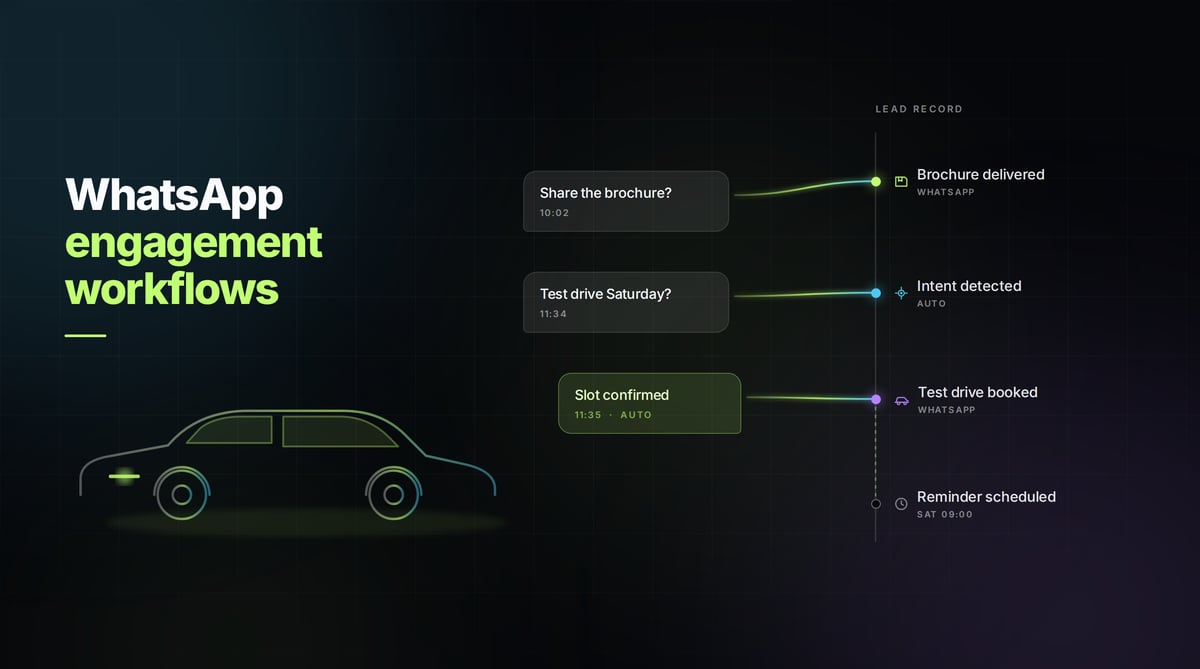
A WhatsApp engagement workflow is an automated sequence of WhatsApp messages triggered by something a lead does, with every message and reply written back to that lead’s record inside the lead management system. The trigger might be a new enquiry, a brochure request, a booked appointment, a stage change or a customer’s own reply. The workflow decides what goes out, when it goes out, and what happens next based on how the customer responds.
The distinction worth holding onto is between broadcasting and workflow. A broadcast tool sends the same message to a list. A workflow reacts to an individual lead’s behaviour and updates the system of record as it goes. One creates volume. The other creates continuity.
Why has WhatsApp become the channel customers expect?
WhatsApp has become one of the preferred channels for customer communication, and the reason is simple. It is already open on the customer’s phone. There is no app to download, no portal to log into, no password to recover, no inbox to check later.
So the requests arrive there. Someone asks for product information. Someone wants a brochure. Someone confirms a test drive slot. Someone follows up on an enquiry they raised four days ago and expects you to remember it. In every case the expectation is the same: a quick response, on the platform they are already using, from a business that appears to know who they are.
That last part is where most implementations struggle. Speed is a technical problem and it is solvable. Continuity is an architectural problem, and it is only solvable if the channel is wired into the lead journey rather than bolted beside it.
What breaks when WhatsApp sits outside the lead journey?
For many organisations, WhatsApp is genuinely in use and still genuinely fragmented. The pattern looks something like this:
- The outbound message is sent from a campaign or messaging tool
- Incoming replies land in a shared inbox or on a device that nobody owns
- The customer’s actual history lives in the CRM, untouched by either
- Attachments like brochures and price lists sit in a drive folder somewhere
- The agent switches between all of them just to understand what the conversation is about
The visible symptom is response delay. The hidden symptom is worse. When context is scattered, the agent asks the customer to repeat themselves. The customer explains their requirement for the second or third time, to the same company, on the same channel. Every repetition tells the customer that nobody is actually tracking their enquiry.
There is a reporting consequence too. If WhatsApp interactions never reach the lead record, they never reach your funnel analytics either. The conversations that most influenced the outcome become the ones you have the least visibility into, which makes it very difficult to know which touches are working and which are noise.
How we connected WhatsApp to the lead timeline
We decided early that WhatsApp would not be a module. It would be part of the lead journey, in the same way a call log or a site visit is part of the lead journey. Practically, that meant three things.
One identity
A WhatsApp number resolves to a lead, and every message on that thread attaches to that lead’s timeline in sequence alongside the calls, forms, emails and stage changes. There is a single chronological view of the relationship rather than a channel-by-channel reconstruction.
Context before the reply
When an agent opens a conversation, the lead’s history is already on screen: what they enquired about, which stage they are in, what was promised last time, what has already been sent to them. The agent does not go looking for context. The context arrives with the conversation.
One place for the record
Conversation history stays with the lead permanently, so it survives agent handovers, shift changes, reassignment and long buying cycles. The next person to pick up the lead inherits the full thread rather than a summary somebody remembered to type.
Which WhatsApp workflows did we automate first?
We started with the messages that were repetitive, predictable and time-sensitive, because those are the ones humans miss when they are busy.
- Instant enquiry acknowledgement. A new enquiry gets a response immediately, confirming what was received and what happens next, so the customer is never waiting in silence for the first reply.
- Product information and brochure delivery. Requested documents go out on the channel where they were asked for, and the send is logged against the lead so the team knows exactly what that customer has already seen.
- Follow-up and appointment reminders. Scheduled reminders for callbacks, appointments and visits, which reduces both no-shows and the number of follow-ups that quietly expire because nobody remembered them.
- Unified conversation history. Every inbound and outbound message stays in one thread on the lead record, which is what makes handovers survivable.
- Response-triggered next actions. What the customer says determines what happens next. An interested reply can create a task, alert an owner or advance the lead. A request for time can reschedule the sequence instead of continuing to push.
That last workflow is the one that changes the character of the system. Without it, automation is a calendar of outbound sends. With it, automation is a conversation that responds to what it hears.
How do you automate WhatsApp without sounding robotic?
This was the hardest design question in the episode, and the answer we settled on has three parts.
Keep every message purposeful
Before a template ships, it has to answer one question: what does the customer get from receiving this? If the honest answer is that the business gets a touchpoint and the customer gets nothing, the message does not ship. The objective was never to send more messages. It was to make sure every message had a purpose.
Automate the predictable, hand over the judgement
Acknowledgements, document delivery and reminders are deterministic and they should run without a human. Negotiation, objection handling, specification advice and anything involving a live decision belong to a person, and the workflow’s job at that point is to route the conversation to the right person with full context attached.
Let customer signals control the pace
A sequence that keeps firing after someone has asked for space is the fastest way to get blocked. Responses should be able to pause, accelerate, branch or stop a workflow, because a customer’s own behaviour is the most accurate cadence data available.
The lesson that stood out across all of it: automation should never replace personalisation. It should make personalisation easier. When the routine work is handled, the agent’s attention is free for the conversation that actually needs a human in it.
What changes for the sales team on the floor?
The measurable change is time recovered. Time not spent searching across systems for context, resending brochures that were already sent, or reconstructing what happened before a handover.
The behavioural change matters more. When a team trusts that context will be there, they stop hedging. Replies get more specific because the agent can see exactly what was discussed. Follow-ups feel like continuations rather than fresh starts. Handovers stop resetting the relationship to zero.
Customers do not remember which system you use. They remember how easy you made it to communicate with your business, and how many times they had to explain themselves.
How does this work in automotive and BFSI journeys?
In automotive, the WhatsApp thread is often where the deal actually moves. An enquiry from a listing or a campaign is acknowledged instantly, the model brochure and variant details go out on request, the test drive is confirmed and then reminded, and the post-visit follow-up references what the customer saw. Because the journey runs across weeks and multiple people at the dealership, having one persistent thread on the lead record is what keeps the buyer from feeling like they are starting over at each stage.
In BFSI, the same architecture serves a different need. Enquiry acknowledgement, document requests, appointment confirmations and status updates are high-frequency and highly repetitive. Running them as workflows with everything written back to the lead record gives the team an auditable trail of what was communicated and when, which matters as much as the customer experience does.
Key takeaways
- WhatsApp engagement workflows attach every message to the lead record so context travels with the conversation
- Fragmentation across a sending tool, a reply inbox and the CRM is what forces customers to repeat themselves
- One identity, context before the reply, and one permanent record are the three architectural requirements
- The first workflows to automate are acknowledgements, document delivery, reminders, unified history and response-triggered next actions
- Automation should make personalisation easier rather than replace it
- Customer responses should control the pace of a sequence, including stopping it
Frequently Asked Questions
What is a WhatsApp engagement workflow? +
A WhatsApp engagement workflow is an automated sequence of WhatsApp messages triggered by a lead’s activity, such as submitting an enquiry, requesting a brochure or booking an appointment, with every message and reply recorded on that lead’s timeline in the lead management system. The workflow decides what is sent, when it is sent, and what action follows based on the customer’s response.
How is a WhatsApp workflow different from a WhatsApp broadcast? +
A broadcast sends the same message to a list of contacts at one time. A workflow responds to an individual lead’s behaviour, adapts based on their replies, and writes every interaction back to the system of record. Broadcasts generate volume, while workflows maintain continuity across a single customer relationship.
Why should WhatsApp be part of a lead management system instead of a separate tool? +
When WhatsApp runs as a separate tool, the message history sits apart from the lead record, so agents switch between systems to understand context and customers end up repeating information they have already given. Building the channel into the lead management system keeps identity, history and next actions in one place, and it means WhatsApp activity shows up in funnel reporting.
What are the first WhatsApp workflows a sales team should set up? +
Start with instant enquiry acknowledgement, brochure and product information delivery, follow-up and appointment reminders, unified conversation history on the lead record, and next actions triggered by customer responses. These five cover the highest-frequency, most time-sensitive communication and they are the messages most often missed when teams are busy.
What is the difference between WhatsApp automation and a chatbot? +
A chatbot is usually designed to answer questions inside a single session. A WhatsApp engagement workflow is designed around the lead journey, so it persists across days and weeks, reacts to stage changes and customer replies, updates the lead record, and hands the conversation to a human when a decision is involved.
See it on your own lead journey
If your WhatsApp conversations currently live outside your lead records, the fastest way to see the difference is on your own funnel. Book a demo and we will walk through how engagement workflows attach to the lead timeline, what gets automated first, and where the handover to a human should sit.